Someone to talk to, when you need it
Choose how you want to talk: with an AI at any time, with a trained person you book, or with a small group.
AI companion
Write to it at any time. It is not a person or a therapist.

Human companion
Book a voice conversation with a trained person who will listen.
How it will workSmall group chat
A short voice conversation with three or four people.
How it will work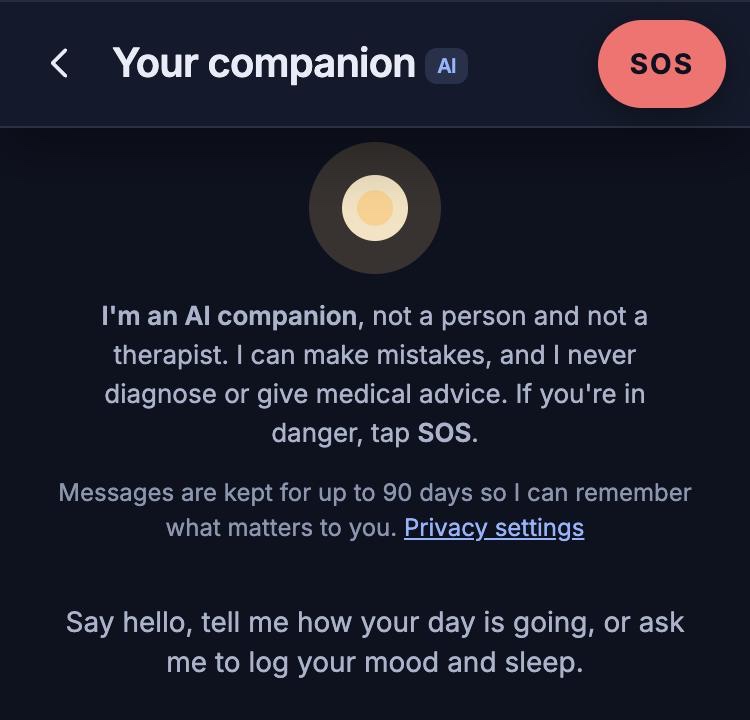
Your AI companion, in the Lifewillow app
Your AI companion
It is not a person or a therapist, and it can make mistakes, so a person is always one step away.
Talks things through
Write to it whenever you like, in your own words, about your day or what is on your mind.
Keeps track
Ask it to log your mood and sleep, and it saves them as your daily check-in.
Suggests a next step
It can suggest a session with a professional, or a short wellbeing questionnaire.
Drafts a weekly summary
If you have a therapist, it drafts a summary for them. You read it first, and nothing is sent until you share it.
What it will not do
- Pretend to be a person. It says it is an AI in its first message and whenever you ask.
- Diagnose, prescribe, or give medication or dosage advice.
- Replace a professional. It encourages you to speak with one about anything clinical.
When something is serious
Every message is checked for signs of self-harm or harm to others, in English and Nigerian Pidgin. The check for the most serious signs runs on fixed rules, separately from the AI.
- Low concern. Your companion suggests a session with a professional.
- Medium concern. Your assigned therapist is told, you are told that they have been, and your companion offers to book a session.
- High concern. SOS opens straight away and our counsellors are alerted.
Your messages
- Who can read them
- Only you. Your professionals and our staff tools cannot read your conversation.
- What the AI receives
- Your recent messages and a short card of context, such as your goals and recent moods. Never your phone number or full name.
- How they are protected
- Encrypted at rest with AES-256-GCM.
- How long they are kept
- Up to 90 days, or 24 hours if you turn memory off. You can delete your whole conversation at any time.

Human companions
Someone to gist with. Book a voice conversation with a real person when you want to talk to someone who will listen.
Choose a time
Book a human companion, as you would a professional.
Talk by voice
You meet in a private room. There is no camera.
Stay anonymous
You use a nickname and an avatar, so you do not have to say who you are.
- Human companions are trained, vetted and paid
- They are not therapists, and the app says so plainly
- They can hand over to your care team or to our counsellors
- Conversations are by voice only. Lifewillow does not arrange one-to-one meetings in person
Small group chats
Sometimes you want more than one voice. Join a short conversation with three or four people around one theme.
- A short voice conversation, with no camera
- Three or four people, and a trained host who can pause the chat or bring in help
- Nicknames only

Common questions
Is my AI companion a real person?
No. It is an AI, and it says so in its first message and whenever you ask. It can make mistakes.
Is a human companion a therapist?
No. Human companions are trained people who will listen, and the app will say this plainly. If you need a therapist, you can book one here.
Can I meet a human companion in person?
No. Human companions are by voice only. Lifewillow does not arrange or sell one-to-one meetings in person.
Will people know my real name?
With human companions and in small group chats, you will use only a nickname and an avatar.
Can my AI companion diagnose me or prescribe medicine?
No. It never diagnoses, prescribes or gives medication advice. For anything clinical, it encourages you to speak with a professional, and you can book one here.
Who can read what I write to my AI companion?
Only you. Your professionals and our staff tools cannot read your conversation. Messages are checked automatically for signs of serious risk, so that help can reach you.
Can I delete my messages?
Yes. You can delete your whole conversation at any time. Otherwise, messages are kept for up to 90 days, or for 24 hours if you turn memory off.
Urgent support
Lifewillow has not opened yet, so its SOS button is not available.
In immediate danger? Call 112 (emergency services).